English
 Arabic
 French
 Spanish
 Portuguese
 Deutsch
 Turkish
 Dutch
Dutch
 Italiano
 Russian
 Romaian
 Portuguese (Brazil)
 Greek
Greek
Taylor Swift & Travis Kelce Wedding: Both celebrity to wed on June 13 at Rhode Island Venue
Celebrities Gossip |
2025-12-09 13:31:43
 Science &Technology
 Education & Grants
 Health & Wellness
 Internet business
 Entertainment
 Government & Polities
 Weird & Mysterious
Alle anzeigen
Weird & Mysterious
Alle anzeigen

Upgrade auf Pro

Learn how to build a powerful AI chatbot from scratch or using existing frameworks. This comprehensive, Novasvet guide covers planning, AI models, NLP, tools, integrations, conversation design, training data, memory architecture, security, deployment, analytics, and real-world best practices.
Chatbots and AI assistants have rapidly evolved from simple automated responders into intelligent conversational systems that can reason, remember, and interact almost like humans. Today, they support customer interactions, streamline business operations, assist with learning, automate repetitive tasks, and enhance user experience across digital platforms. Whether you’re a developer, a business owner, or just curious about the technology, understanding how modern chatbots are built — and what makes them effective — has become increasingly valuable.
In this comprehensive guide, we’re going to take you step-by-step through the full process of creating a chatbot, from foundational concepts to advanced real-world implementation techniques. You’ll not only learn what chatbots are and how they work, but also how to design their personality, structure their conversations, integrate them into systems, give them memory, connect them with data sources, keep them secure, and continuously improve them after deployment.
Unlike many articles that provide surface-level summaries, this one dives deeply into the real architecture, logic, decision-flow, and engineering principles behind powerful AI-driven chatbots. By the end, you’ll have a clear, practical understanding of how to build a chatbot that is truly useful — one that communicates naturally, understands the user’s intent, learns over time, and works reliably in real-world environments.
Artificial intelligence chatbots are transforming business, development, and digital interaction. But there’s a huge gap:
❗ Most guides only cover surface-level basics
❗ Most “tutorials” ignore real-world deployment
❗ Many focus strictly on either business or technical — not both
This article solves all of that.
You’re about to read the most complete, detailed, practical guide on building a chatbot. Whether you’re:
a developer building from scratch
a business owner wanting a bot for customer service
a startup building an AI product
a marketer automating user interaction
or an enthusiast experimenting with LLMs
You will walk away with clarity and a blueprint.
Most explanations are oversimplified:
“A chatbot is a computer program that talks to humans.”
But let’s define it properly.
A chatbot is a system that:
receives input (text / voice / context / data)
interprets user intent
retrieves or generates responses
may perform actions or automation
returns the best possible reply or result
There are 3 core types of chatbots:
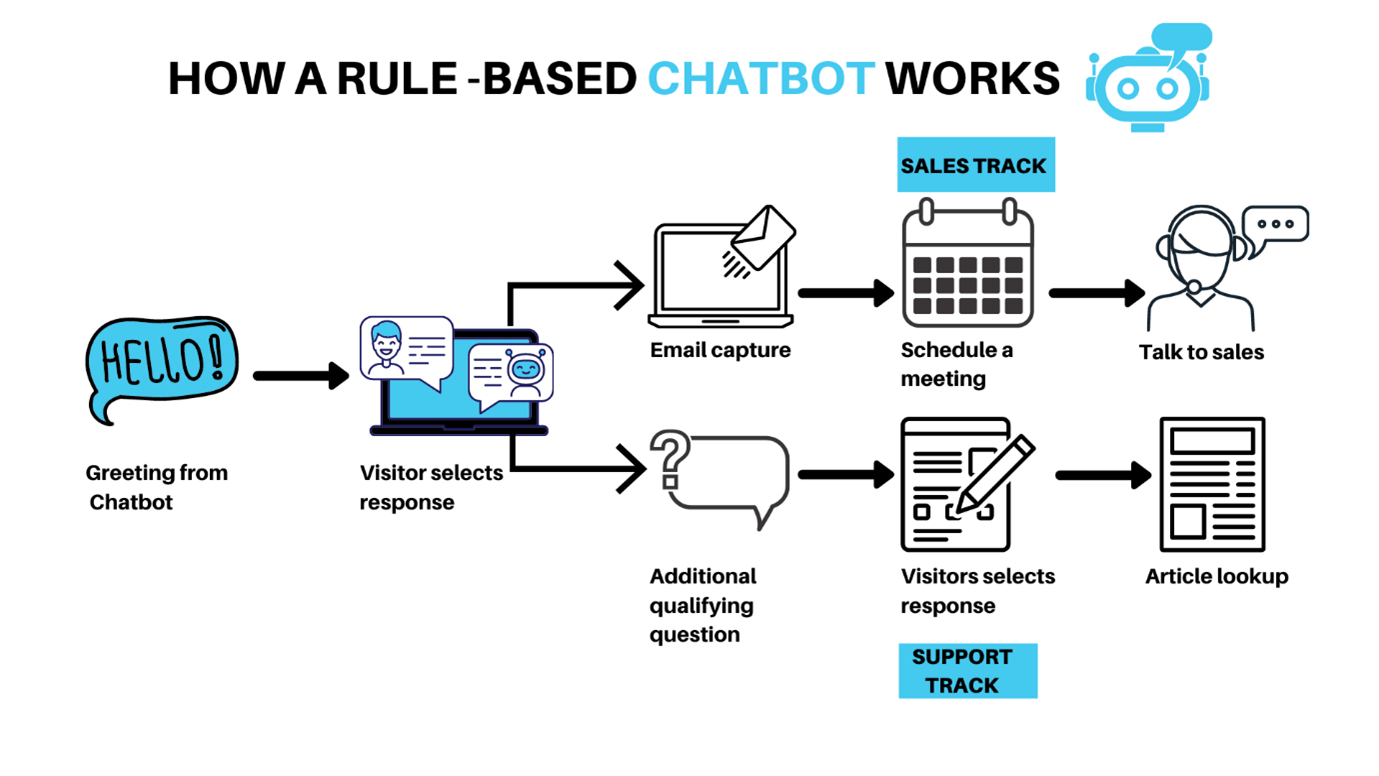
respond using pre-set responses
work with menu flows
predictable but limited
select responses from a knowledge base
use NLP to find the best matching answer
safer and predictable
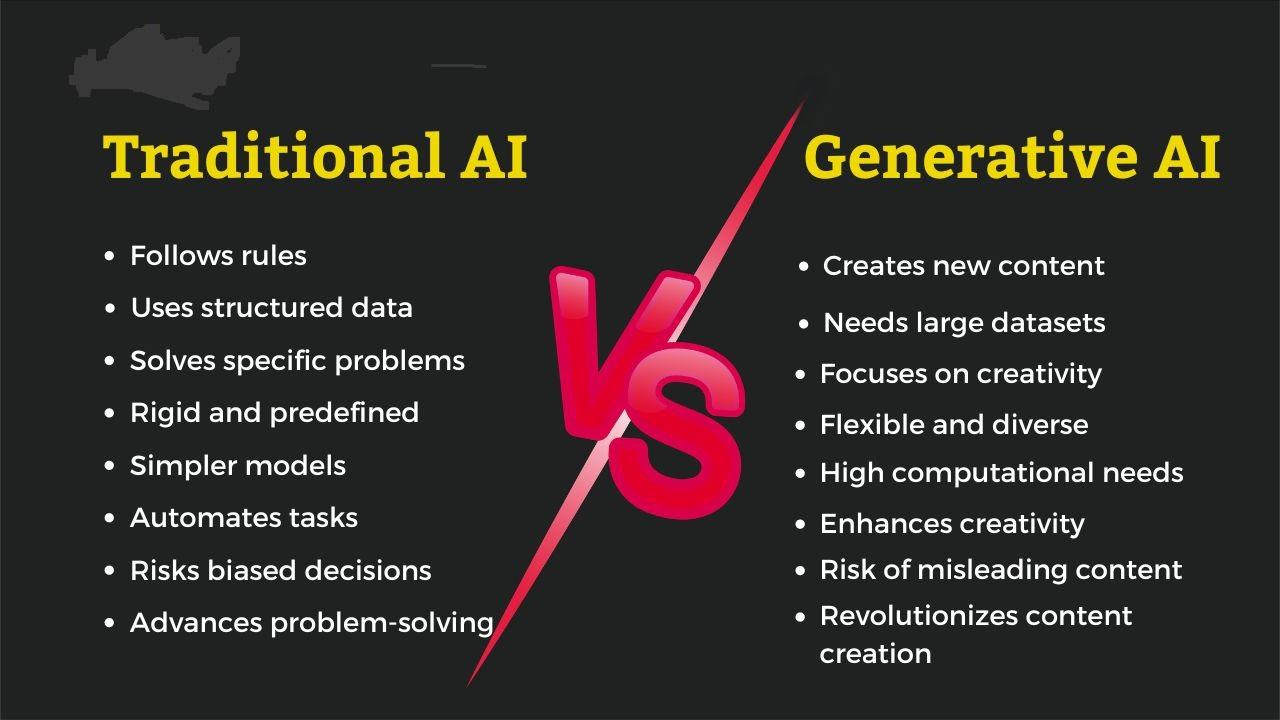
use large language models (LLMs)
generate responses dynamically
conversational and human-like
can reason, infer, relate context
Most people immediately jump into coding.
That’s a mistake.
“What do I want this chatbot to do?”
Here are strategic categories:
replies to FAQs
returns store info
tracks orders
handles complaints
support ticket escalation
qualifies leads
offers product recommendations
pushes users toward conversion
provides human handoff
HR assistant
IT helpdesk
knowledge base navigation
training assistant
CLI assistants
debugging helper
engineering documentation navigation
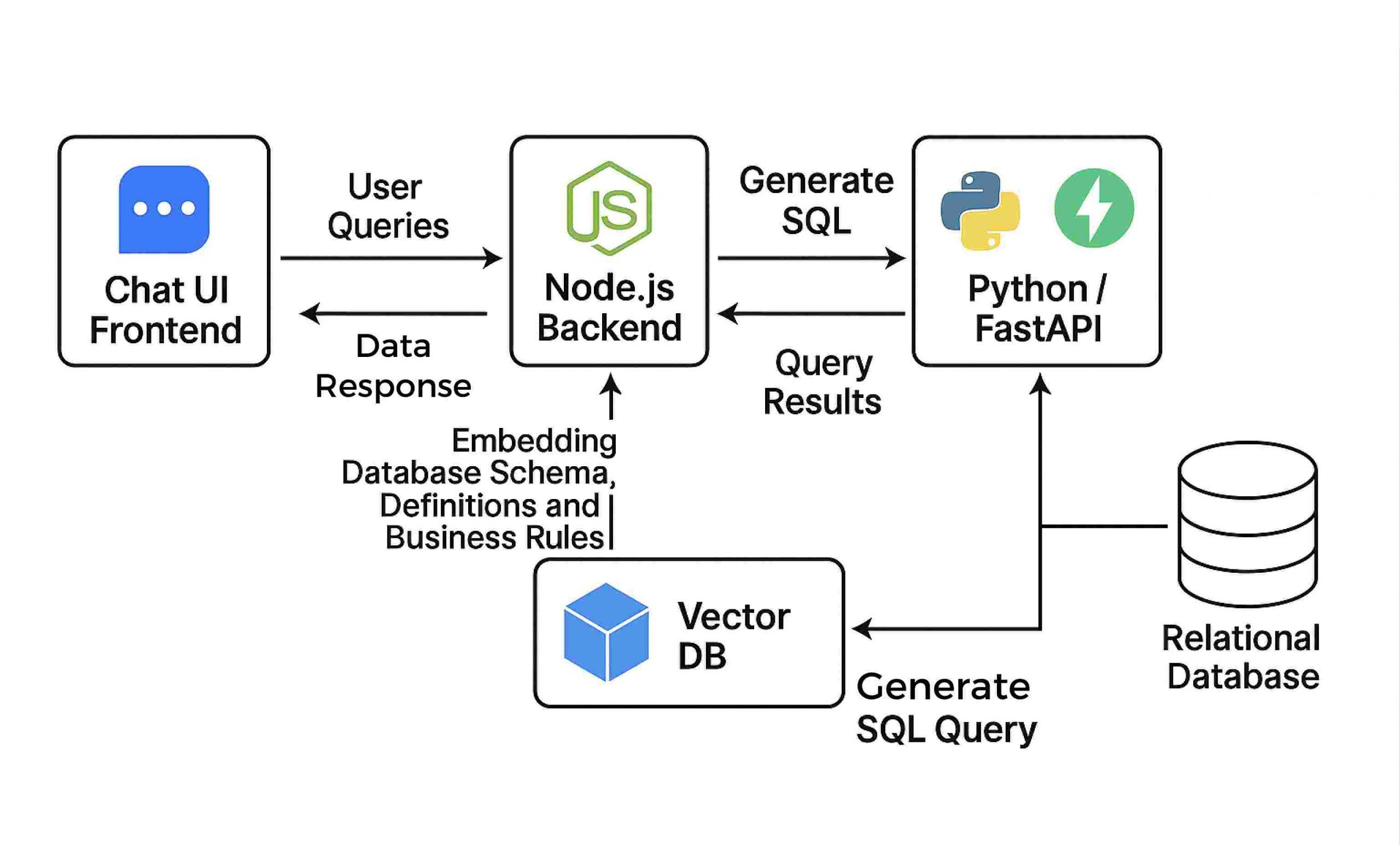
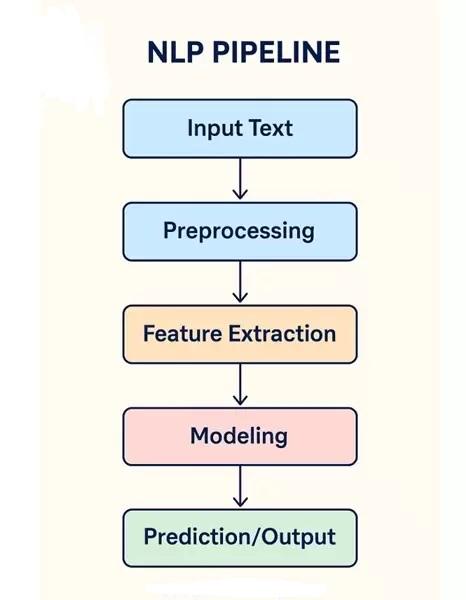
Here’s the real architecture that most guides never explain.
Input interface
web chat widget
Slack
Voice input
API endpoint
NLU / NLP processing (intent detection)
entity extraction
intent matching
Model layer
rule-based scripting
classification
retrieval
LLM (GPT-like generative model)
Memory & context storage
short-term conversation context
long-term user profile
embeddings in vector DB
Knowledge base
FAQs
docs
imported PDFs
corporate data
Action execution
call API
retrieve database records
trigger automation
Output generation
final response
suggested follow-up
call-to-action
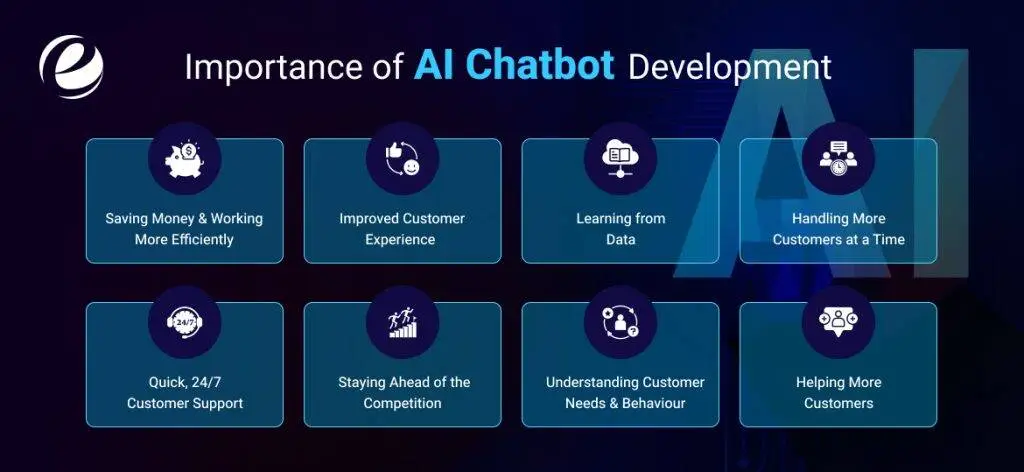
This section addresses both business and development needs.
Examples:
Tidio
Chatbot.com
Voiceflow
Make.com
Good for:
non-technical founders
simple chatbots
quick deployment
customer automation
Not good for:
deep customization
proprietary datasets
complex logic
custom memory systems
custom actions
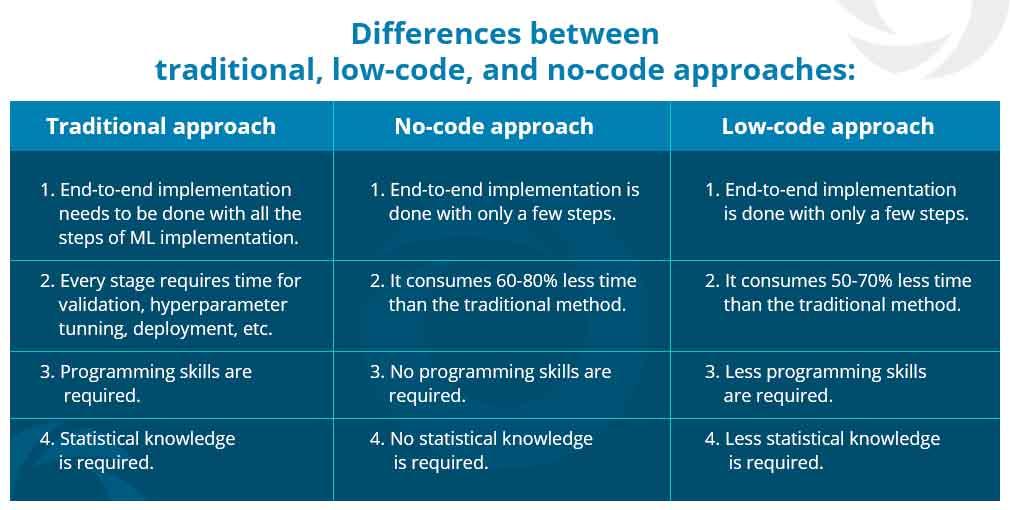
Examples:
n8n
Botpress
Retool
Good for:
moderate complexity
building prototypes
API integration
Languages / frameworks:
Python
JavaScript / Node.js
Next.js
Flask
LangChain
Rasa
spaCy
Good for:
enterprise-grade bots
confidential data control
full logic definition
ML training pipeline
Even business readers will understand this.
User says:
“Where is my order?”
The chatbot must figure out:
user intent: order tracking
required entity: order number
user status: logged in / not logged in
Convert user text into tokens
Compare embeddings with stored intent vectors
Select intent with highest semantic match
This is how AI knows that:
“track my package” ≈ “where is my order” ≈ “delivery status”
Even if the words differ.
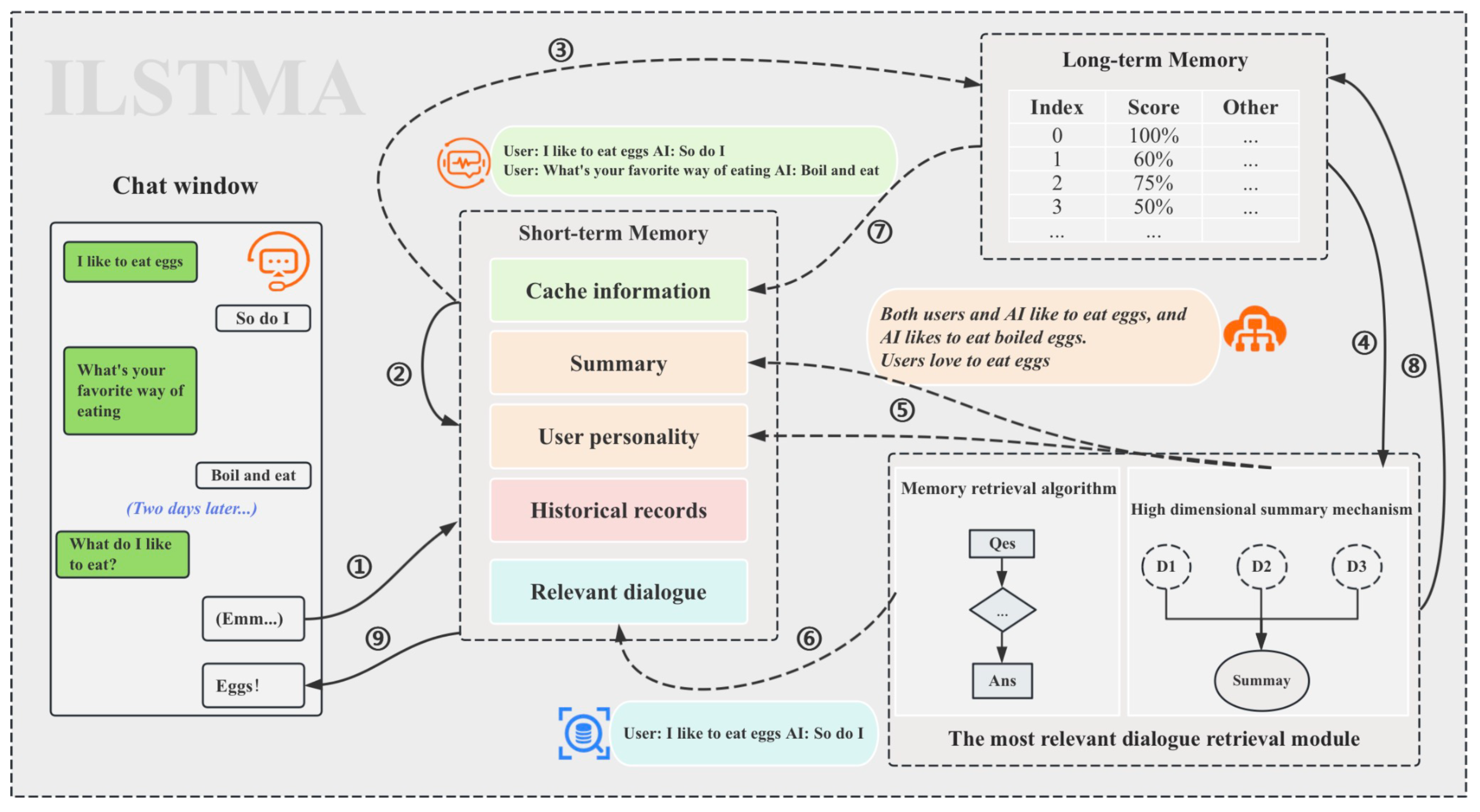
To make a bot truly intelligent, it needs memory.
The chatbot remembers:
previous messages in the conversation
name of the user
current topic context
Example:
User: “My name is Kelvin.”
Later…
Bot: “Kelvin, I’ve found the information.”
Stored in:
embeddings store
knowledge graph
Bot remembers over time:
preferences
purchase history
previous complaints
FAQs already answered
Even highly technical bots need personality guidelines.
A general AI assistant should be:
friendly
knowledgeable
concise
polite
context-aware
confidence-rated (knows when to admit uncertainty)
We define a personality script:
Tone: helpful, warm, intelligent
Formality: neutral–friendly
Reply length: short to medium unless asked for detail
Use of emojis: optional, minimal in professional contexts
Expression style: explains concepts as if teaching
Humility rule: if uncertain → ask clarifying questions
Example directive:
If you are not fully certain about a fact, ask a follow-up question instead of guessing.
This avoids hallucinations.
This is the real art of chatbot design.
Instead of random responses, we define structured communication flows.
Example intent categories for a general AI assistant:
Define a concept
Summarize text
Explain something step by step
Translate
Suggest actions
Recommend tools
Perform calculation
Brainstorm ideas
Retrieve knowledge
Ask clarifying questions
Training data quality = chatbot intelligence.
Data sources may include:
FAQs
wiki pages
product documentation
website pages
manuals
tutorials
past support records
For a general AI assistant, we create:
User: “explain machine learning”
Bot: “Machine learning is a type of AI where systems learn from data rather than explicit programming…”
User: “rewrite this in simpler English…”
Bot: “Sure, here’s a simplified version…”
User: “what does this code do?”
Bot: “This function takes X as input and returns Y…”
We also define what it should NOT do:
no fake info
no toxic language
no personal attacks
no copyright violation output
no medical/legal/financial guaranteed claims
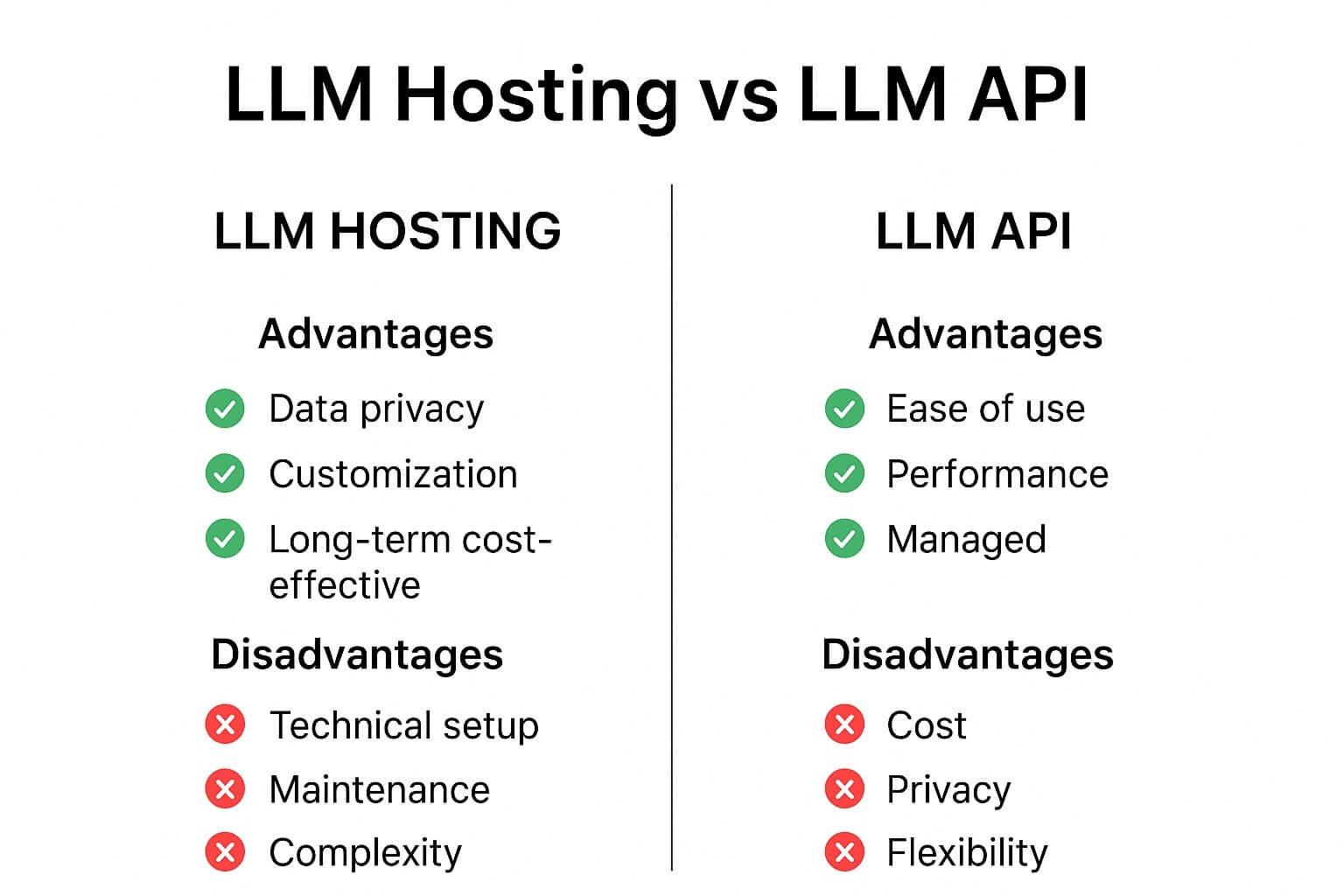
There are several choices:
Claude
Llama APIs
DeepSeek
Mistral
Pros:
fastest
low cost
minimal engineering
strong performance
Cons:
data may leave your system
dependency on vendor
Pros:
full control
local execution
privacy
no vendor lock-in
Cons:
requires GPUs
requires tuning
This is where your chatbot stops being “generic AI” and becomes your bot.
The modern technique:
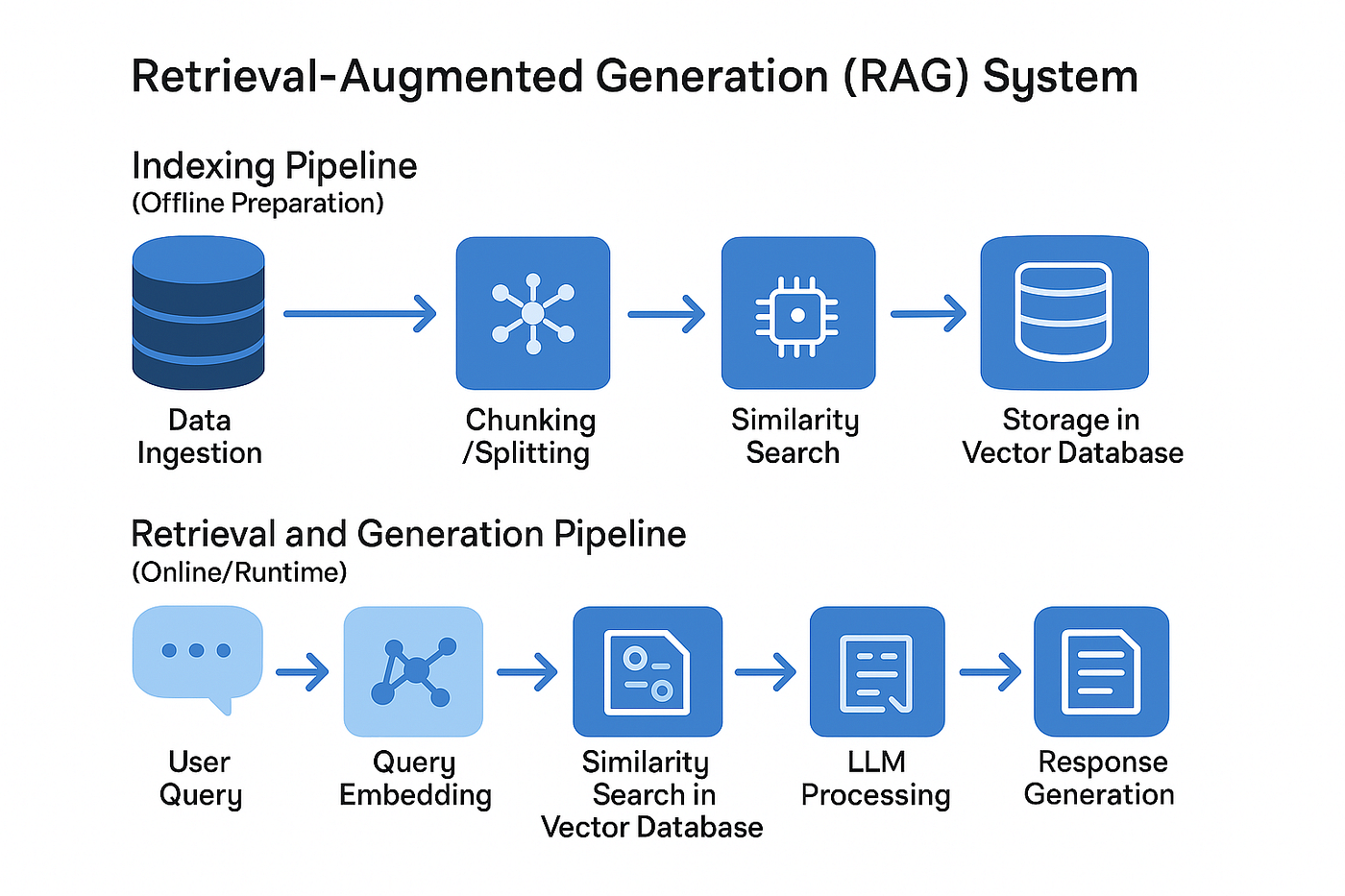
RAG (Retrieval Augmented Generation)
Process:
User asks a question
chatbot searches stored knowledge
retrieves matching text
feeds it into the model
model answers using that data only
Example:
User: “What are your business hours?”
Bot retrieves from stored docs:
We are open from 9am–6pm GMT+1, Monday–Friday.
Bot responds with that exact verified info.
We implement:
Stored in:
conversation buffer
Stored in:
summarized context chunks
Stored in:
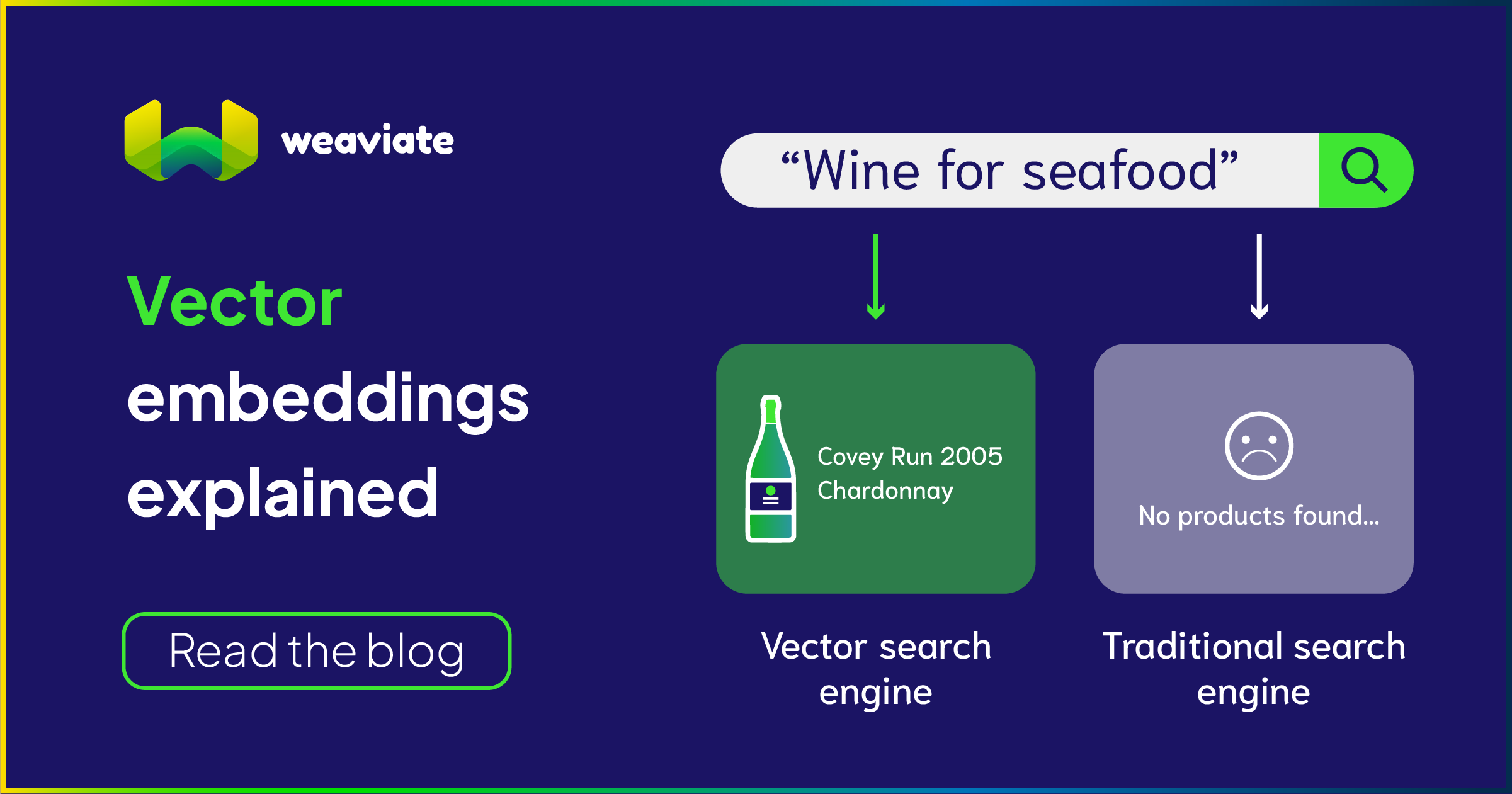
vector database (ChromaDB, Pinecone, Qdrant, Weaviate, Redis vector store)
Example behavior for general AI assistant:
User: “My birthday is July 14.”
Later…
Bot: “By the way, your birthday is in 2 months — anything planned?”
We add safety fallback techniques:
If low → respond:
I’m not certain — could you clarify?
When referencing stored knowledge
According to your uploaded document…
Did you mean A or B?
This makes your bot reliable.
Your AI assistant can exist in:
Mobile app
Telegram
Discord
Slack
Browser extension
API endpoint
OS-level assistant
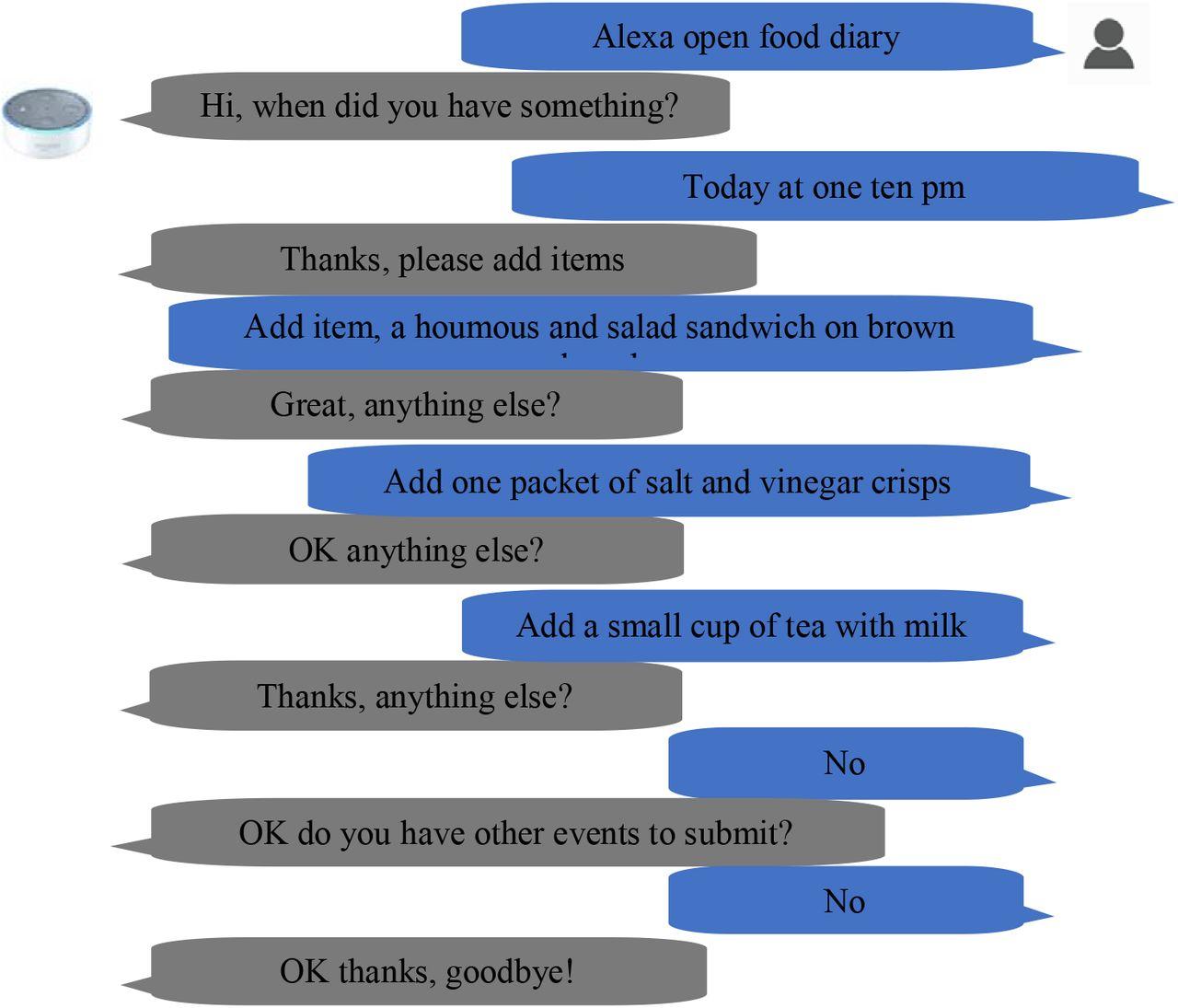
User: explain blockchain like I’m 10
Bot: Imagine a notebook that everyone can see, and every time something is written in it, everyone gets a copy. Nobody can erase a past entry, so everyone always knows what really happened.
User: summarize this text…
Bot: Sure — here are the 5 key ideas…
User: write me a polite decline message for a job offer
Bot: Certainly — here’s a human-sounding and respectful version…
User: can you remember my writing style?
Bot: Yes — I’ll adapt my tone and word choice to match your style throughout future responses.
A chatbot should improve over time using:
unanswered question logs
user satisfaction score
intent mismatch logs
message timing latency
session duration
conversion metrics
retention
This leads to iterative refinement.
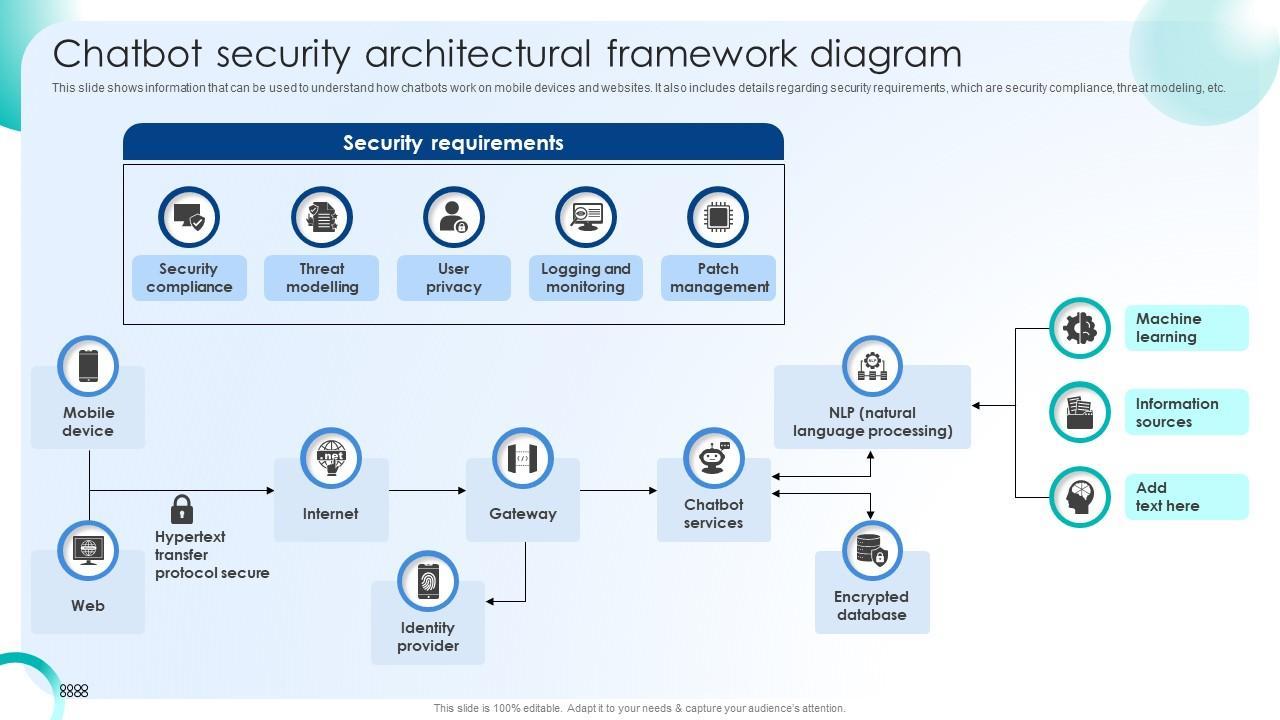
A responsible chatbot must ensure:
anonymization
GDPR compliance
response filtering
anti-leak behavior
rate limiting
You can deploy on:
Google Cloud
Azure
Docker container
Scaling considerations:
handle concurrent users
load balancing
model quantization
GPU utilization
Your general AI assistant will soon be able to:
understand voice
generate voice replies
store lifelong memory
behave as a personal digital employee
integrate with personal task automation
anticipate user needs
A chatbot typically uses predefined responses or simple keyword matching, while conversational AI uses machine learning and natural language understanding to interpret user intent, maintain context, and generate intelligent, flexible responses.
No. Many no-code tools allow you to build a chatbot using visual builders and templates. However, if you want a highly customized AI assistant with memory, integrations, and unique capabilities — programming knowledge or a technical team becomes useful.
Popular choices include:
Python (most common for AI & NLP)
JavaScript / Node.js (great for web integration)
TypeScript
Go (fast & efficient)
Python dominates in the AI space due to libraries like spaCy, HuggingFace, TensorFlow, and LangChain.
It depends on your needs:
For quick setup → GPT-based APIs
For enterprise privacy → self-hosted Llama/Mistral
For limited hardware → smaller optimized models
The best approach is often hybrid:
Use an external LLM for reasoning + a private local knowledge base for proprietary data.
Yes — if designed with memory and feedback loops.
Chatbots can use:
vector databases
preference storage
personalization data
This allows them to adapt, improve, and eventually predict user needs.
Security depends on implementation. A responsible chatbot should use:
data encryption
authentication
rate limiting
filtering
compliance (GDPR, ISO, etc.)
Enterprises often prefer storing data locally or on private cloud servers.
Not completely.
Ideally:
the bot handles repetitive questions
humans handle complex, emotional, or exceptional cases
The best setup combines both into a seamless system with human handoff.
You provide your materials:
website pages
PDF documents
support logs
email archives
knowledge base exports
These are indexed into embeddings that the chatbot can recall when answering questions.
With no-code tools: 1–3 days
With low-code integrations: 1–2 weeks
With custom development: 1–3 months
The timeline depends on:
level of complexity
size of knowledge base
desired intelligence
integrations
testing & refinement
Costs vary depending on scale:
Light usage: a few dollars per month
Moderate business usage: $50–300/month
Heavy enterprise usage: $1,000+/month
Self-hosting can reduce API costs but increases hardware and maintenance expenses.
Yes — modern AI models can understand and respond in:
English
French
German
Spanish
Portuguese
Arabic
Chinese
and many more
Models like GPT and Llama support multilingual conversation by default.
Important metrics include:
user satisfaction rating
conversation success rate
fallback rate
average session duration
return users
conversion rate
cost per assisted interaction
Analytics should guide continuous improvement.
Training modifies the model itself (requires deep ML knowledge).
Prompting controls how the model responds without retraining (much easier).
Most modern chatbots rely on prompting and RAG — not full model retraining.
Yes — chatbots can connect to:
CRM systems
databases
spreadsheets
inventory systems
SMS platforms
Slack
Teams
Zapier
n8n
Make.com
Integration turns the bot into an automation agent.
Yes, they can make mistakes.
But accuracy improves dramatically when they:
use verified knowledge sources
ask clarifying questions
cite context sources
restrict responses to known data
A well-designed bot can achieve 95–99% accuracy for domain questions.
You now have a complete blueprint for building a general-purpose AI assistant that functions:
✔ conversationally
✔ contextually
✔ intelligently
✔ practically
✔ responsibly
Building a powerful AI chatbot requires careful planning, the right tools, and a clear understanding of user needs. Whether you’re a developer or a business owner, this guide provides everything you need to create an intelligent, reliable, and human-like AI assistant. Start building your chatbot today and transform the way you interact with users, automate tasks, and deliver exceptional digital experiences.