

 Science &Technology
 Education & Grants
 Health & Wellness
 Internet business
 Entertainment
 Government & Polities
 Weird & Mysterious
The Ultimate Guide to Computer Viruses (2025) – Definition, Types, Lifecycle & Protection

Learn what computer viruses are, how they spread, the main types, and how to protect your systems. A deeply detailed, beginner-friendly yet expert comprehensive guide covering virus history, anatomy, and real-world examples.
1. Introduction
Few topics in technology carry as much fear and fascination as the computer virus. From the early days of floppy disks to the cloud-connected era of AI and IoT, computer viruses have remained a constant threat — changing shape, purpose, and complexity over time.
A computer virus is a piece of code designed to replicate and spread from one system to another without user consent. Much like its biological counterpart, it infects a host, uses its resources to propagate, and can damage the system, steal information, or disrupt normal operations.
Understanding computer viruses isn’t just about technical curiosity; it’s a necessity. Modern society depends on digital infrastructure for banking, healthcare, communication, and national security. A single malicious program can cripple a hospital, freeze a business, or expose millions of personal records within hours.
This guide will walk you through everything you need to know — from definitions and historical milestones to virus types, lifecycle, propagation, detection, and defense. Whether you’re a beginner trying to grasp the basics or a tech-savvy reader looking for in-depth understanding, this comprehensive reference is designed for you.

2. Computer Virus vs. Malware: Clearing the Confusion
One of the most common misconceptions in cybersecurity is treating “virus” and “malware” as the same thing. They are related but not identical.
-
Malware (short for malicious software) is the umbrella term for any program designed to harm, exploit, or compromise a computer system. This includes viruses, worms, Trojans, ransomware, spyware, and adware.
-
A virus, on the other hand, is a specific type of malware that replicates by attaching itself to legitimate programs or files. When the infected file runs, the virus executes and spreads.
2.1 Analogy for Clarity
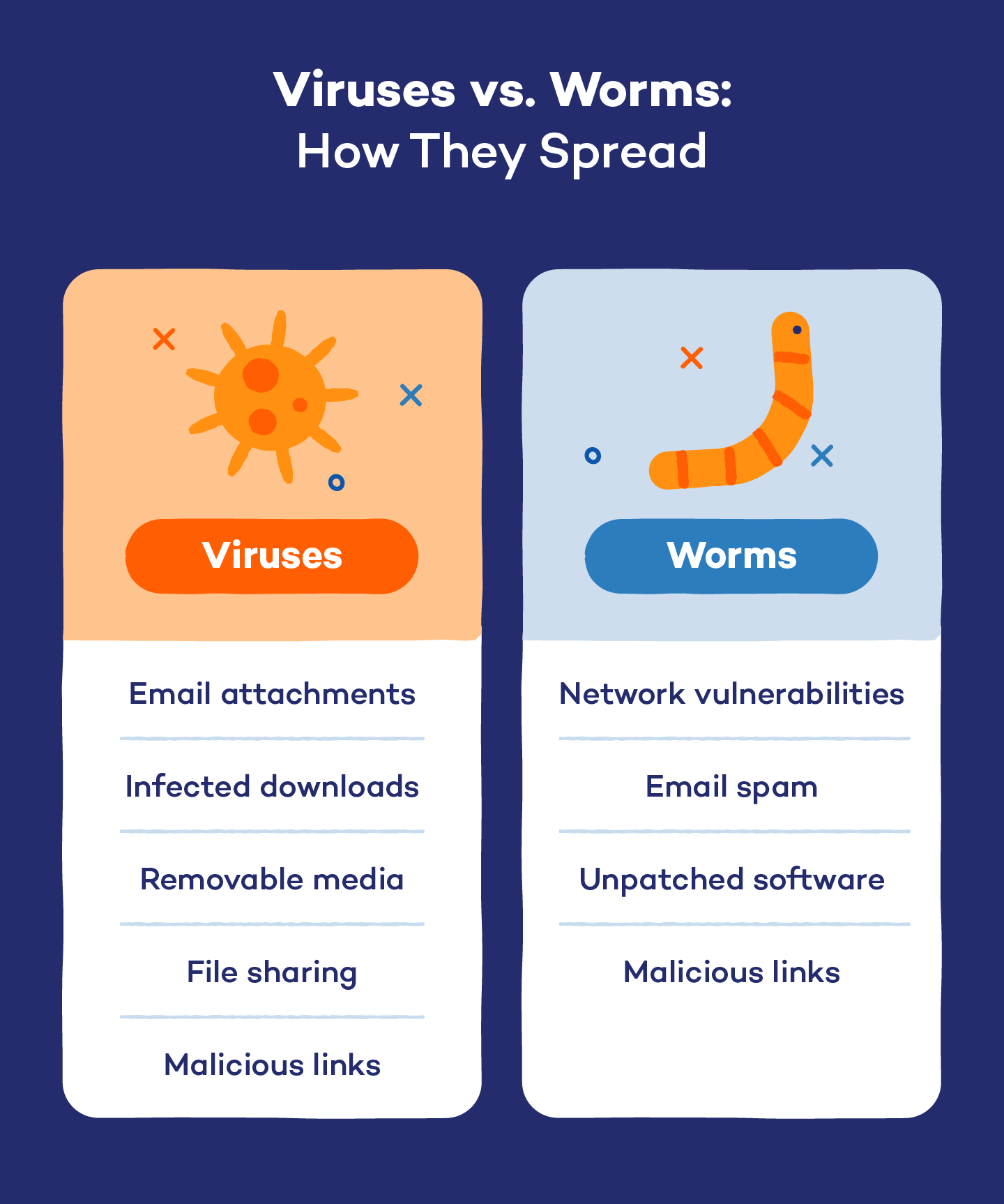
Think of malware as the entire category of infectious diseases, while a virus is just one strain within that category. A worm spreads on its own, a Trojan disguises itself as a useful program, but a virus always needs a host file to spread.
2.2 Key Differences at a Glance
| Feature | Computer Virus | General Malware |
|---|---|---|
| Definition | Malicious code that replicates by infecting host files | Any software built to harm a computer system |
| Replication Method | Needs a host program to execute | Varies (worms self-replicate, Trojans trick users, etc.) |
| Activation Trigger | Executes when the infected host runs | Some run automatically or silently |
| Goal | Disruption, corruption, or data theft | Can include espionage, extortion, tracking, ads, etc. |
| Detection & Removal | Typically by signature or behavioral scanning | Depends on malware type and vector |
2.3 Why the Distinction Matters
Understanding this distinction is essential for cyber defense. Different malware types require different containment and removal strategies. For example, you remove a virus by cleaning or deleting infected files, while a worm may require network segmentation to stop its spread. Using the right terminology also improves incident reporting and communication with security vendors or IT teams.
3. Historical Timeline & Famous Computer Viruses
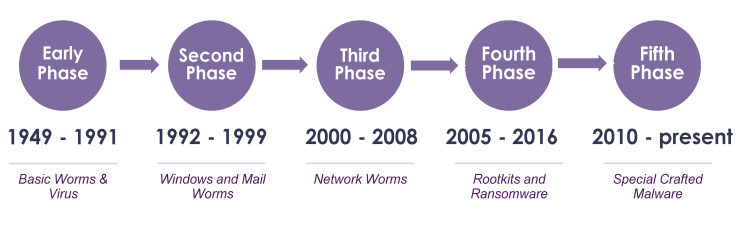
Computer viruses have a long and fascinating history. They evolved alongside the computers they infected. Here’s a timeline of key milestones and notorious examples that shaped the cyber landscape.
3.1 The Early Years (1970s – 1980s)
-
1971 — The Creeper Virus: Often considered the first computer virus. It infected ARPANET (mainframe) systems and displayed the message “I’m the Creeper, catch me if you can!” A counterprogram called Reaper was created to delete it — the first antivirus.
-
1982 — Elk Cloner: Created by a 15-year-old student, it spread via Apple II floppy disks and displayed a poem on the screen after every 50th boot. This marked the beginning of viruses spreading beyond academic networks.
-
1986 — Brain Virus: Originating from Pakistan, it infected MS-DOS boot sectors and was the first virus to spread widely on IBM PCs.
3.2 The Boom Era (1990s)
-
Michelangelo Virus (1992): Designed to overwrite critical data on March 6 (Michelangelo’s birthday). Media coverage sparked public panic and raised awareness of computer security.
-
Concept (1995): The first macro virus targeting Microsoft Word documents. It exploited the new macro feature to spread through email attachments.
-
CIH (Chernobyl) (1998): One of the most destructive viruses ever. It overwrote critical system files and corrupted the BIOS, rendering computers unbootable.
3.3 The Internet Age (2000s)
-
ILOVEYOU (2000): Spread via email with the subject “I LOVE YOU”. It infected millions of computers within hours, causing billions in damages. Its simplicity and social engineering tactics made it legendary.
-
Melissa (1999) — a precursor to ILOVEYOU — also spread via email attachments and crippled corporate mail servers.
-
Slammer (2003) and Blaster (2003): Worms that exploited network vulnerabilities to propagate automatically without email attachments.
3.4 The Modern Era (2010 – Present)
-
Stuxnet (2010): Discovered targeting Iranian nuclear facilities. It was a highly sophisticated virus designed to damage industrial control systems — believed to be state-sponsored.
-
Conficker (2008–2015): A self-updating worm that infected millions of Windows machines and formed a botnet for spamming and further attacks.
-
WannaCry (2017) and NotPetya (2017): Technically ransomware, but demonstrated virus-like spreading capabilities. They exploited EternalBlue vulnerabilities and paralyzed businesses and governments globally.
-
Emotet (2019–2021) and beyond: Modern malware families blur the lines between virus, worm, and Trojan, often using multiple vectors for infection.
3.5 Lessons from History
-
Viruses evolve with technology. Each new platform creates new opportunities for infection.
-
Social engineering is often as effective as code exploits. Most users “open the door” by executing infected files.
-
Defensive software evolves too. From simple signature scanners to AI-based EDR systems, defense is a constant arms race.
4. Virus Anatomy & Lifecycle
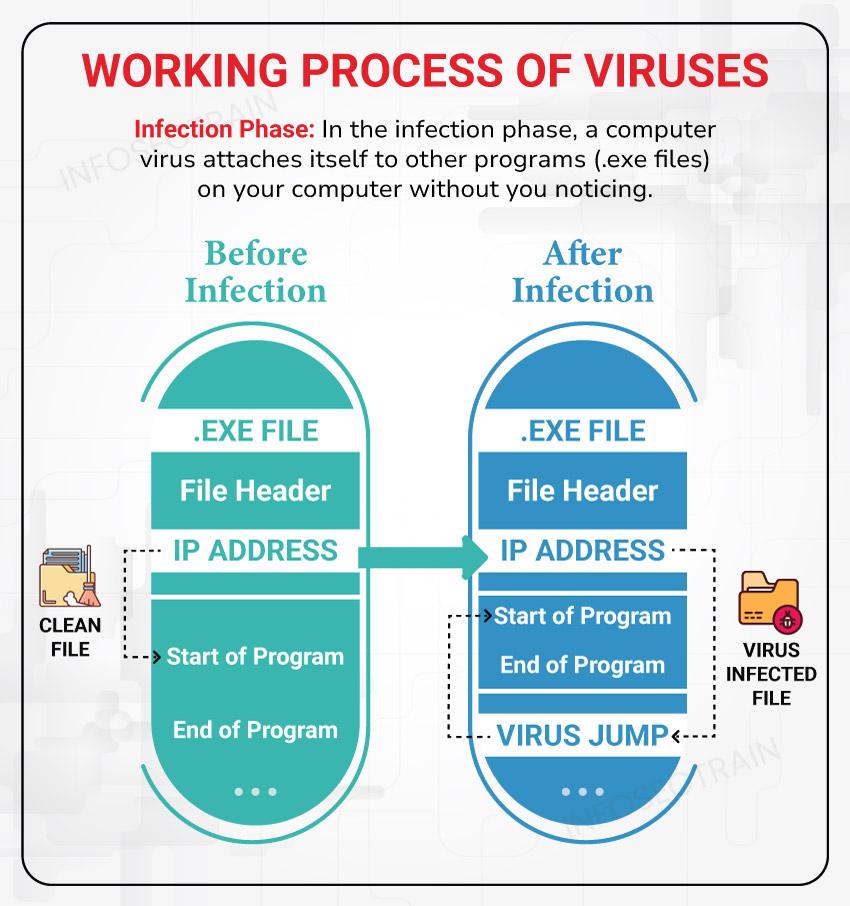
Understanding a virus’s anatomy helps you see how infection occurs and where to defend. Every computer virus has three main components and a multi-stage lifecycle.
4.1 Core Components of a Computer Virus
-
Infection Mechanism (Infect Routine)
The engine that finds and infects targets. It may append code to executables, overwrite boot sectors, or attach to macros. -
Payload
The portion of code that performs the intended action — data deletion, corruption, display messages, or launch further malware. -
Trigger Condition
Determines when the payload activates — could be a specific date, system event, or user action.
4.2 Lifecycle Phases
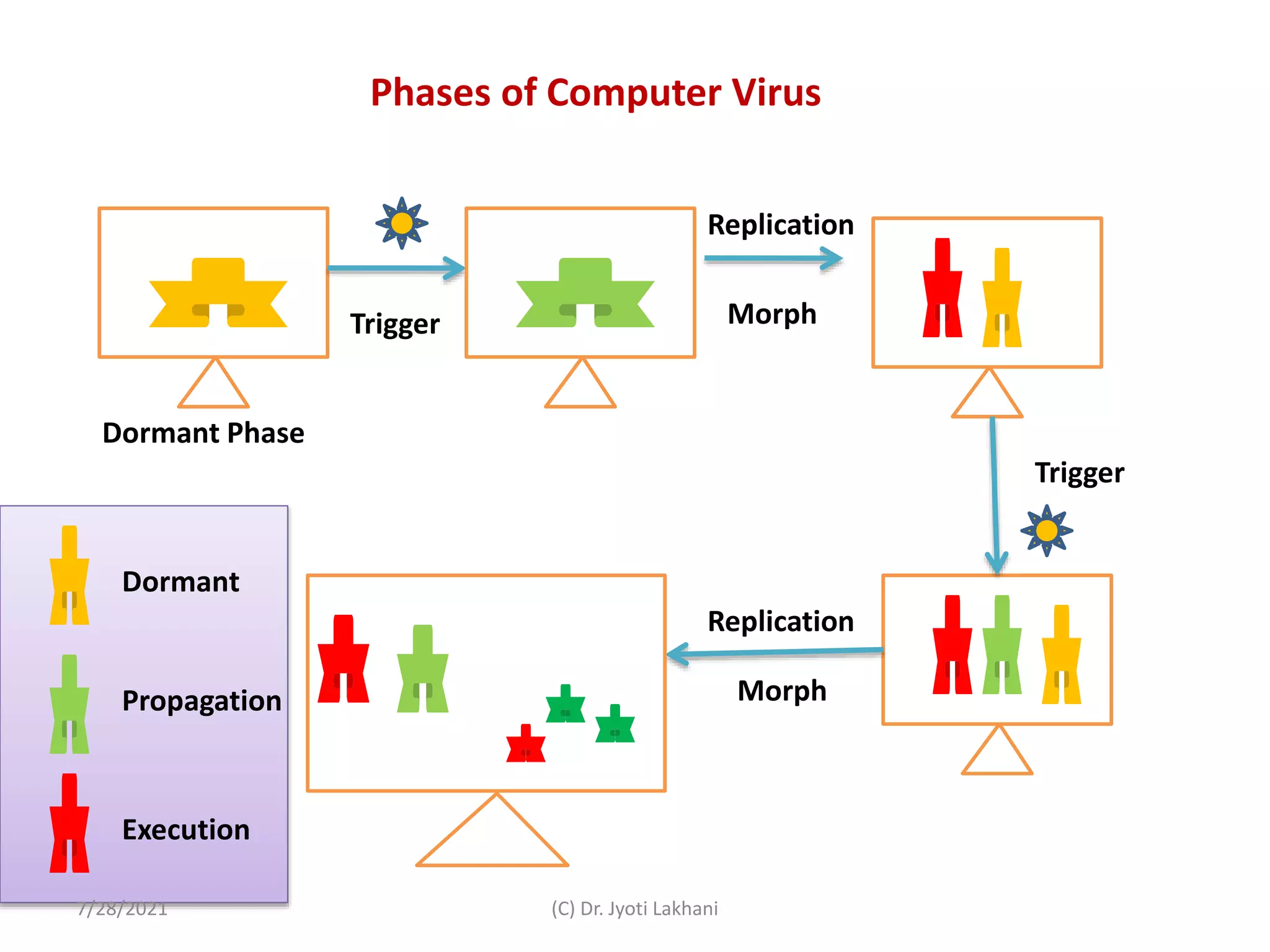
A virus’s life cycle typically progresses through five stages:
| Phase | Description |
|---|---|
| 1. Dormant | The virus lies inactive until trigger conditions are met. |
| 2. Propagation | It replicates and infects new files or systems through network shares, removable media, or email attachments. |
| 3. Triggering | A specific event activates the payload — a date, program execution, or system state. |
| 4. Execution | The payload runs — this is where the damage or intended action occurs. |
| 5. Detection & Removal | Users or antivirus tools detect and attempt to remove it — sometimes too late. |
4.3 Behavioral Characteristics
-
Self-Replication: Viruses copy themselves onto multiple files or systems.
-
Polymorphism: Some viruses encrypt or change their code slightly each time to evade signature detection.
-
Stealth: Rootkit-like techniques hide the virus from the operating system and antivirus tools.
-
Persistence: They may modify registry entries, scheduled tasks, or system services to survive reboots.
-
Payload Diversity: From mischievous messages to industrial sabotage, payloads vary widely.
4.4 Modern Virus Adaptations
Today’s viruses rarely exist in isolation. They often form part of a larger malware ecosystem, working with Trojans and worms for multi-stage attacks. Advanced variants are modular — meaning the infection engine and payload are delivered separately and updated remotely.
Some modern features include:
-
Fileless execution: Resides entirely in RAM to avoid file traces.
-
Command-and-Control communication: Contacts remote servers for instructions.
-
Anti-sandbox behavior: Detects testing environments and halts execution to avoid analysis.
-
Living-off-the-Land (LOTL): Uses legitimate system tools like PowerShell or WMI to spread and hide.
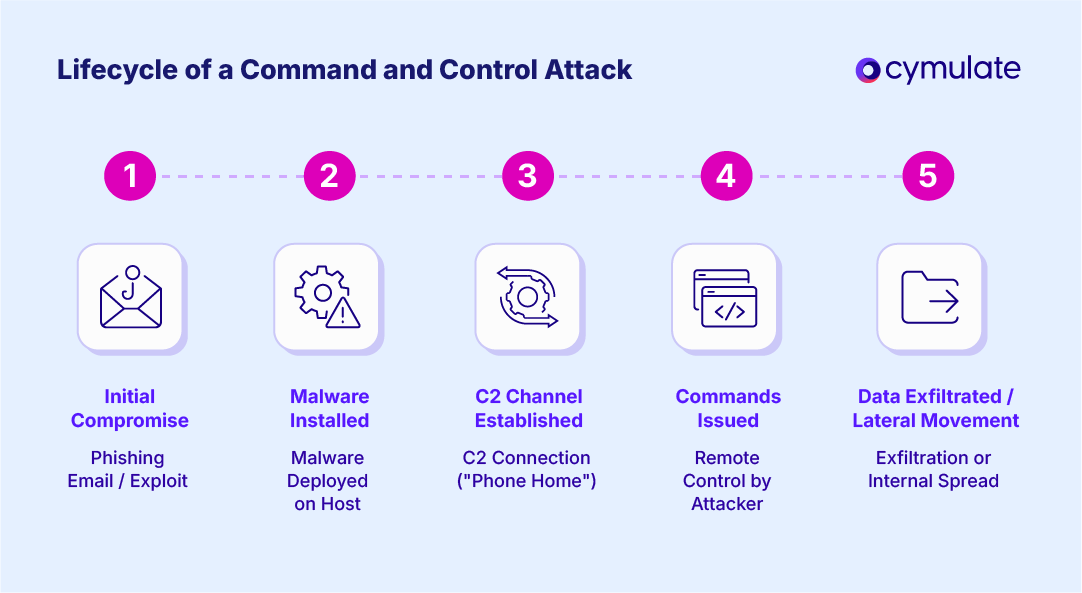
6. Common Types of Computer Viruses
Computer viruses come in many forms, each designed to exploit specific weaknesses in a system or user behavior. Below are the most common and notable categories you should know.
6.1 File Infector Viruses
These are among the oldest and most common virus types. A file infector attaches itself to executable files such as .exe or .com. When you run the infected file, the virus activates and spreads to other programs on your system.
Example:
The “Cascade” virus (1987) was a classic file infector that caused text on screens to fall and “cascade,” all while replicating itself.
Risk Level: Moderate to high — can corrupt essential system files and render software unusable.
6.2 Boot Sector Viruses
Boot sector viruses infect the master boot record (MBR) or boot sectors of storage drives. They activate as soon as the computer boots, before the operating system even loads, which makes them difficult to remove.
Example:
The “Brain” virus (1986) — the first IBM PC virus — targeted boot sectors and displayed hidden text credits to its creators.
Risk Level: Very high — may prevent computers from starting or accessing drives.
6.3 Macro Viruses
Macro viruses exploit the scripting features of applications such as Microsoft Word or Excel. They hide in documents or spreadsheets, activating when the file is opened.
Example:
“Melissa” (1999) spread through Word documents sent by email. Once opened, it forwarded itself to the victim’s Outlook contacts.
Risk Level: High — spreads quickly through email and shared files.
6.4 Polymorphic Viruses
A polymorphic virus constantly changes its code each time it replicates. These changes make it difficult for antivirus software to recognize it through traditional signature detection.
Example:
The “Storm Worm” used polymorphic techniques to evade detection across millions of infected computers.
Risk Level: Very high — extremely stealthy and adaptive.
6.5 Resident Viruses
Resident viruses install themselves into a system’s memory. Once active, they can infect other programs and files without needing to re-run the original infected file.
Example:
The “CMJ” and “Meve” viruses were common memory-resident infections on early DOS systems.
Risk Level: High — can persist even after infected programs are deleted.
6.6 Multipartite Viruses
These complex viruses combine multiple infection methods — for example, infecting both boot sectors and files simultaneously. This makes them particularly challenging to remove completely.
Example:
The “Tequila” virus (1991) used both file and boot sector infections to spread widely.
Risk Level: Severe — can reinfect systems if not thoroughly cleaned.
6.7 Web Scripting Viruses
These viruses target web browsers by exploiting vulnerabilities in scripts (such as JavaScript). They can redirect users to malicious websites or inject harmful code into legitimate pages.
Example:
Cross-site scripting (XSS)-based viruses can steal cookies or session data when users visit compromised pages.
Risk Level: Medium to high — often used in phishing or credential theft attacks.
6.8 Network and Email Viruses
These spread via email attachments, shared drives, or network connections. They often exploit weak passwords, unpatched software, or human error.
Example:
“Mydoom” (2004) and “ILOVEYOU” (2000) were massive global outbreaks that spread primarily through email.
Risk Level: Severe — can propagate within minutes across corporate or personal networks.
6.9 Encrypted and Stealth Viruses
Encrypted viruses use encryption to hide their malicious payloads. Only a small decryption module remains visible, making it harder for antivirus scanners to detect them.
Example:
The “Win32/Simile” virus used heavy encryption and polymorphism, changing appearance constantly.
Risk Level: Very high — detection and analysis are complex.
6.10 Metamorphic Viruses
Metamorphic viruses take stealth to another level — they rewrite their entire code structure each time they replicate, without changing their function. This allows them to completely evade signature-based detection.
Example:
The “Zmist” virus (early 2000s) was a landmark metamorphic virus known for its complexity and sophistication.
Risk Level: Extreme — difficult even for modern antivirus engines to detect.
7. How Computer Viruses Spread (Infection Vectors)
Knowing how viruses spread is critical to preventing them. While older viruses relied on floppy disks or USB drives, modern ones use more deceptive and automated means.
7.1 Removable Media (USBs and External Drives)
A classic infection method. When a user connects an infected drive, the virus copies itself to the host system automatically.
Modern examples include autorun.inf infections that launch as soon as a USB is plugged in.
7.2 Email Attachments and Links
Email remains the most popular infection vector. Attackers often send infected attachments or links disguised as invoices, resumes, or urgent messages.
Even a simple-looking .docx file can contain embedded macros or scripts that execute malware when opened.
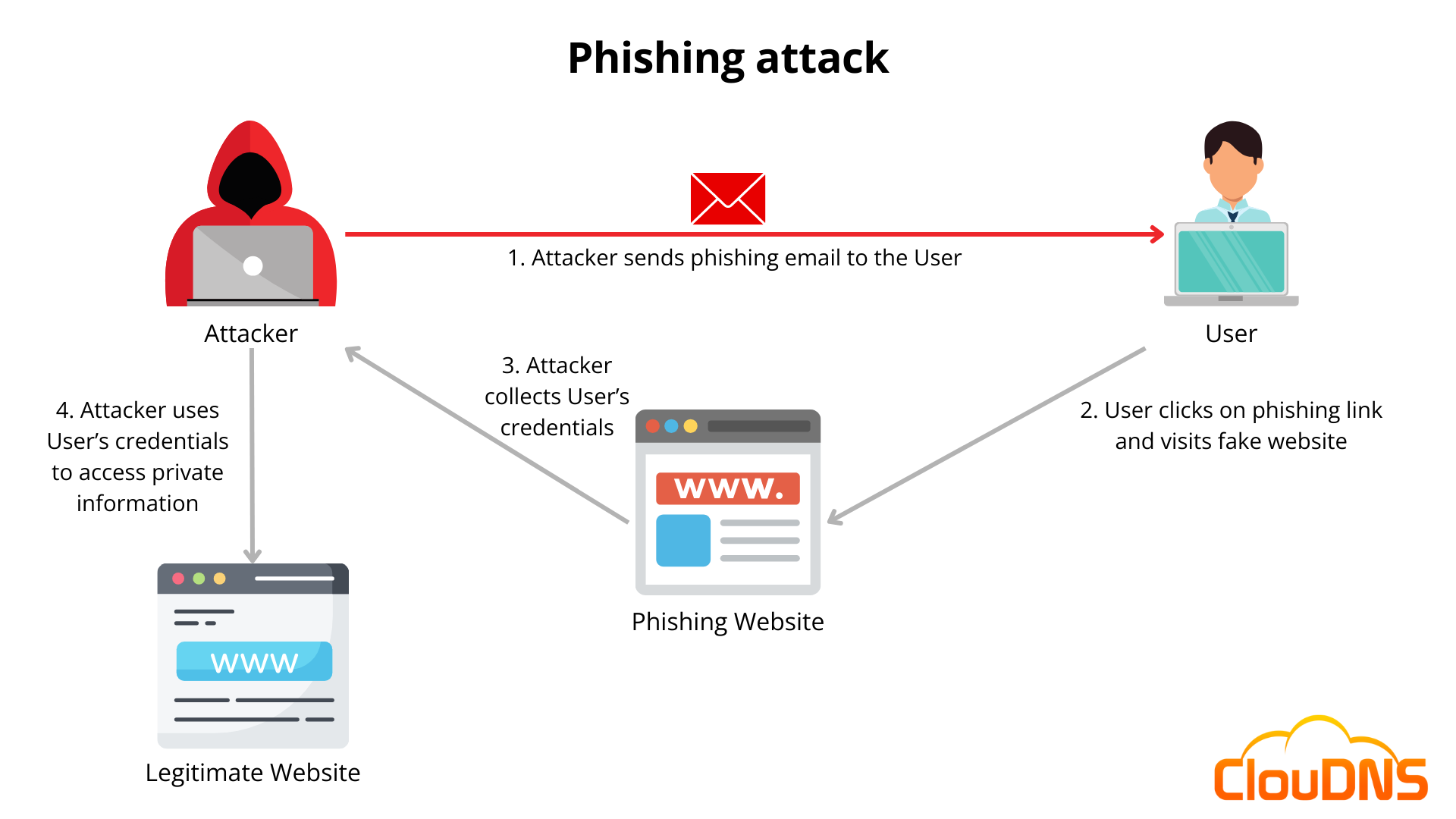
7.3 Drive-By Downloads
These occur when visiting a compromised website that automatically downloads a malicious file. Victims don’t even need to click anything — outdated browsers or plugins are enough for infection.
7.4 Software Vulnerabilities
Unpatched software provides easy entry for viruses. Attackers scan the web for known vulnerabilities in operating systems, browsers, or applications and exploit them remotely.
7.5 Peer-to-Peer (P2P) File Sharing
Pirated content and torrent networks are popular hiding spots for infected executables or installers. Users who download cracked software often unknowingly install hidden viruses.
7.6 Fake Software Updates
Pop-ups claiming “Your Flash Player is outdated” or “System needs urgent update” often trick users into downloading fake installers loaded with malware.
7.7 Network Propagation
Some viruses move automatically across local or enterprise networks. Once they compromise one machine, they scan and infect others using shared drives or weak credentials.
7.8 Social Engineering and Phishing
Many infections begin with manipulation rather than code. Cybercriminals exploit human psychology — fear, urgency, or curiosity — to make users click infected links or run attachments.
8. How Viruses Evade Detection
Over the years, cybersecurity experts have developed sophisticated antivirus tools. In response, viruses have evolved advanced evasion methods. Here are the main ones:
8.1 Polymorphism and Metamorphism
As explained earlier, these techniques change the virus’s code every time it replicates, confusing signature-based antivirus systems that rely on fixed patterns.
8.2 Encryption
Some viruses encrypt their payload, so only a tiny decryptor stub remains visible. Without the decryption key, antivirus engines struggle to identify the hidden code.
8.3 Rootkit Integration
A rootkit hides malicious files and processes at the operating system level. When a virus installs with rootkit support, it becomes invisible to both users and antivirus programs.
8.4 Code Injection
Viruses can inject malicious code into legitimate processes (like “explorer.exe” or “svchost.exe”), making detection harder since they appear as trusted applications.
8.5 Fileless Techniques
Modern threats often don’t use files at all. Instead, they run directly in system memory (RAM), leaving no traditional traces for antivirus tools to scan.
8.6 Anti-Analysis and Sandbox Detection
Advanced viruses can detect if they are running in a virtual environment or sandbox (a tool used by researchers). They stay dormant until they detect a real user system, avoiding early detection.
8.7 Delayed Activation
Some viruses delay execution for days or weeks after infection, reducing the chance of being linked to the initial source or activity.
9. Modern Virus Examples and Case Studies
9.1 Stuxnet: The Industrial Disruptor
Discovered in 2010, Stuxnet was the first known cyberweapon. It targeted Iran’s nuclear facilities and caused physical damage to centrifuges by manipulating control systems. It was so advanced that experts believe it was developed by nation-states.
Key Traits:
-
Spread via infected USB drives.
-
Exploited multiple zero-day vulnerabilities.
-
Carried a highly specific payload targeting Siemens industrial controllers.
-
Used stolen digital certificates for authentication.
Impact:
Revolutionized the concept of cyberwarfare, proving that viruses could cause real-world physical destruction.
9.2 WannaCry: The Global Ransomware Outbreak
In May 2017, WannaCry infected over 230,000 computers in more than 150 countries within days. It combined ransomware with a worm, exploiting the EternalBlue vulnerability in Windows.
Key Traits:
-
Encrypted users’ files and demanded Bitcoin ransom.
-
Spread automatically through networks.
-
Affected hospitals, corporations, and government agencies.
Impact:
Estimated losses exceeded $4 billion. It prompted governments and enterprises worldwide to accelerate patch management and cybersecurity readiness.
9.3 ILoveYou: The Email Virus That Took Over the Internet
The ILOVEYOU virus (2000) spread through email with the subject “ILOVEYOU” and an attachment named “LOVE-LETTER-FOR-YOU.txt.vbs.” Once opened, it overwrote files and spammed itself to every contact in the victim’s email address book.
Impact:
Over 45 million computers infected in under 10 days. Caused approximately $10 billion in damages globally.
9.4 Mydoom: The Fastest-Spreading Virus in History
Launched in 2004, Mydoom spread faster than any virus before it. It created backdoors on infected machines and used them for distributed denial-of-service (DDoS) attacks.
Impact:
Infected millions of Windows systems and caused massive email slowdowns worldwide. Variants are still detected today.
9.5 Conficker: The Network Menace
Conficker (2008) exploited Windows vulnerabilities and infected millions of computers, creating one of the largest botnets ever recorded.
Impact:
Although not directly destructive, it gave attackers control over large numbers of machines, later used for other attacks.
10. How to Detect a Computer Virus , Remove it & future Protection strategies
Detecting a computer virus isn’t always straightforward. Some viruses announce themselves dramatically, while others operate quietly for months. Awareness of the symptoms and diagnostic methods is essential for early intervention.
10.1 Common Signs of Infection

-
Unusual System Slowdowns:
Viruses consume memory and processing power, causing noticeable lags even when no heavy programs are running. -
Unexpected Crashes or Freezes:
If your system frequently restarts or shows blue screen errors, a malicious process might be interfering with system files. -
Missing or Corrupted Files:
Viruses can delete, rename, or encrypt files without warning. -
Unauthorized Network Activity:
Unexplained data usage or unusual outgoing connections may indicate a virus communicating with a remote server. -
Pop-Ups and Strange Ads:
Sudden floods of ads, fake alerts, or browser redirects often accompany infections. -
Disabled Security Tools:
Many viruses disable antivirus software, firewalls, or Windows Defender to avoid detection. -
Unknown Programs or Processes:
Check your task manager — strange background applications can signal infection.
10.2 Built-In Detection Methods
Most operating systems today include basic antivirus tools:
-
Windows: Windows Defender (Microsoft Defender) scans files in real-time.
-
macOS: XProtect and Gatekeeper automatically check for known threats.
-
Linux: While less targeted, tools like ClamAV offer reliable detection.
10.3 Advanced Virus Detection Tools
For deeper inspection, cybersecurity experts use specialized software such as:
-
Malwarebytes Anti-Malware: Detects modern viruses and trojans.
-
Kaspersky Virus Removal Tool: Performs deep cleaning of stubborn infections.
-
ESET Online Scanner / Trend Micro HouseCall: Free, cloud-based scanning options.
-
Sandboxing tools (e.g., Cuckoo Sandbox): Allow isolated execution of suspicious files to observe behavior.
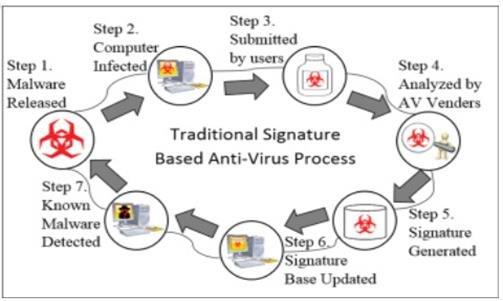
10.4 Manual Detection
If you suspect a virus and want to investigate manually:
-
Open Task Manager or Activity Monitor and look for unfamiliar processes.
-
Check Startup Programs — many viruses launch automatically at boot.
-
Use Network Monitoring Tools to identify suspicious outbound connections.
-
Review System Logs for unexpected file changes or security warnings.
Manual checks can reveal suspicious behavior early, but for most users, combining them with professional antivirus tools is safest.
11. Virus Removal and System Recovery
Once a system is infected, swift and systematic action is necessary to stop the virus from spreading or causing permanent damage.
11.1 Step-by-Step Virus Removal Process
Step 1: Disconnect from the Internet
Immediately disconnect Wi-Fi or Ethernet to prevent the virus from spreading or communicating with its control server.
Step 2: Enter Safe Mode
Restart your computer in Safe Mode. This limits startup programs and stops most viruses from loading automatically.
Step 3: Use a Reliable Antivirus or Malware Removal Tool
Run a full system scan using trusted software such as:
-
Malwarebytes
-
Bitdefender
-
Kaspersky
-
Norton Power Eraser
These tools can automatically quarantine and remove most infections.
Step 4: Delete Temporary Files
Use tools like Disk Cleanup or CCleaner to remove temporary files where viruses often hide.
Step 5: Check Browser Settings
Viruses sometimes alter browser settings or add malicious extensions. Reset all browsers and clear caches.
Step 6: Verify and Restore System Files
Use built-in commands such as:
-
sfc /scannow(Windows) -
Disk Utility → First Aid (macOS)
to repair corrupted system files.
Step 7: Change All Passwords
After cleaning, change passwords for all accounts that may have been compromised, especially email and banking credentials.
Step 8: Create Fresh Backups
Once you’re certain the system is clean, make verified backups of important files.
11.2 When Removal Fails: Full System Reinstallation
If antivirus tools cannot remove the infection, a clean reinstall of the operating system is the ultimate solution. Format your drive, reinstall the OS, and restore only clean, verified backups.
Tip: Always reinstall from official sources (Microsoft, Apple, or Linux distribution sites) — not from third-party mirrors.
11.3 Recovering Encrypted or Corrupted Files
If your files were encrypted by a virus or ransomware:
-
Check if free decryption tools are available at NoMoreRansom.org.
-
Use shadow copies or previous versions (Windows) to restore unencrypted backups.
-
For essential data, seek help from professional recovery services.
Never pay ransoms — there’s no guarantee you’ll regain access, and it funds further attacks.
12. Prevention: How to Stay Protected from Computer Viruses
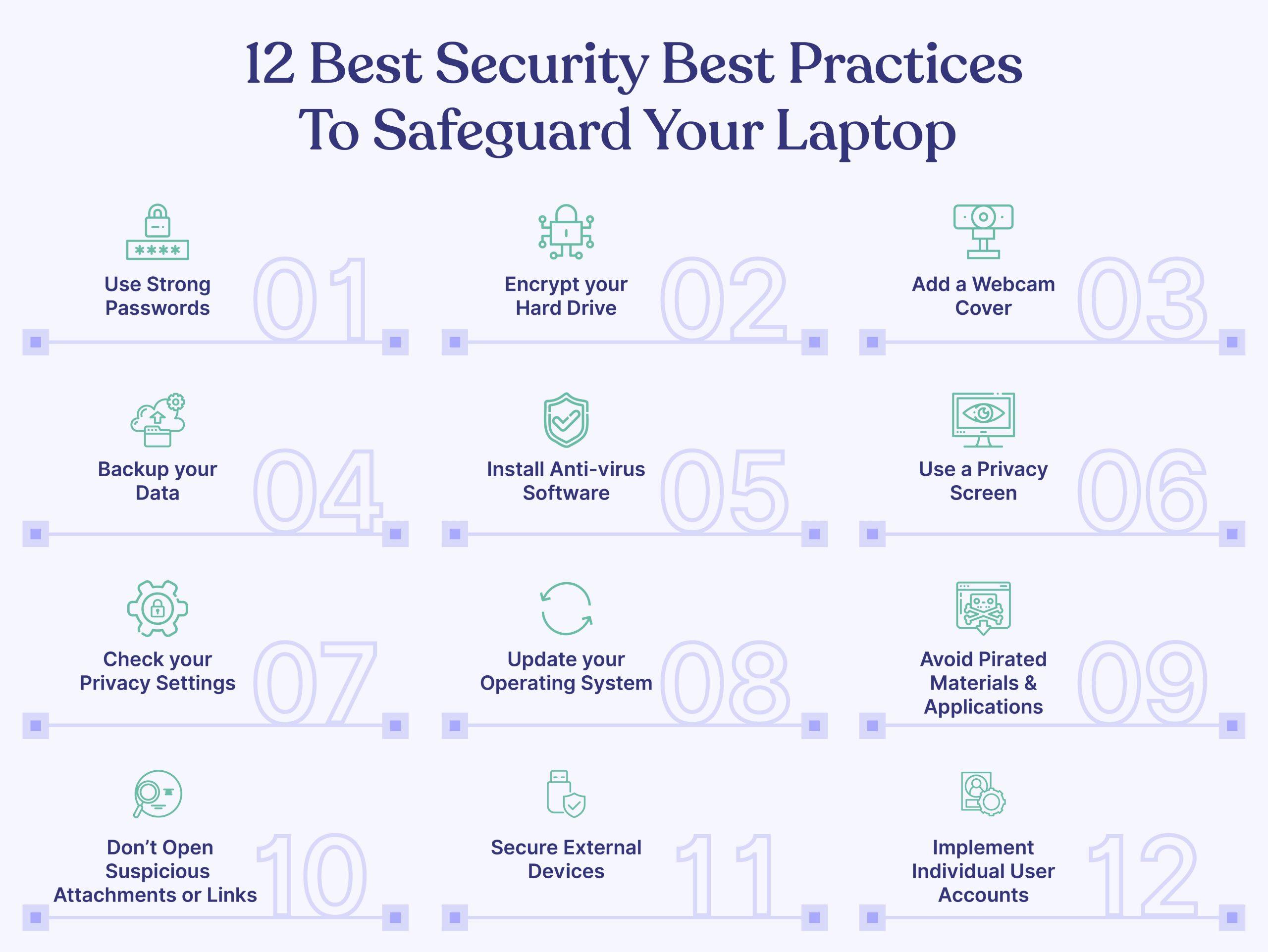
The best defense is prevention. By combining good habits with proper security tools, you can drastically reduce the risk of infection.
12.1 Keep Software and Systems Updated
Unpatched software is one of the most common attack vectors.
-
Enable automatic updates for your operating system, browsers, and critical applications.
-
Regularly update firmware for routers and IoT devices as well.
12.2 Use Reputable Antivirus Software
Choose an antivirus program with real-time protection and frequent updates. Some top-rated 2025 options include:
-
Bitdefender
-
Norton 360
-
Kaspersky
-
McAfee
-
ESET Smart Security
These detect, block, and quarantine viruses before they can execute.
12.3 Enable Firewall Protection
A firewall acts as a gatekeeper, filtering incoming and outgoing traffic. Both Windows and macOS come with built-in firewalls — make sure they’re always on.
12.4 Practice Safe Email Habits
-
Never open attachments from unknown senders.
-
Beware of urgent or emotionally charged messages.
-
Hover over links before clicking to check the true destination.
-
Disable automatic downloading of attachments in your email client.
12.5 Download from Trusted Sources
Avoid pirated software, cracked games, and unverified app stores. Always prefer official websites or app marketplaces.
12.6 Use Strong, Unique Passwords
Weak passwords are easy entry points. Use complex combinations of letters, numbers, and symbols. Password managers like 1Password or Bitwarden can generate and store them safely.
12.7 Backup Regularly
Maintain at least two backups:
-
A local backup (external hard drive or NAS).
-
A cloud backup (Google Drive, Dropbox, or iCloud).
Frequent backups ensure data recovery even if infection occurs.
12.8 Be Wary of Removable Devices
Scan all USBs and external drives before accessing files. Disable autorun features to prevent automatic infections.
12.9 Avoid Public Wi-Fi for Sensitive Tasks
Public networks can be easily compromised. If necessary, use a VPN to encrypt your traffic.
12.10 Cyber Hygiene for Enterprises
Organizations should implement layered security:
-
Endpoint protection and centralized monitoring.
-
Regular employee training against phishing.
-
Strict access controls and network segmentation.
-
Routine security audits and patch management.
13. Antivirus Technologies Explained
Modern antivirus solutions combine multiple detection methods to stay ahead of evolving threats. Here’s how they work under the hood.
13.1 Signature-Based Detection
This method compares files to a database of known malware “signatures.”
-
Pros: Fast and accurate for known viruses.
-
Cons: Ineffective against new or modified threats.
13.2 Heuristic Analysis
Heuristic scanning analyzes a program’s structure and behavior to detect suspicious patterns, even if the virus isn’t in the database.
-
Pros: Detects new, unknown variants.
-
Cons: May produce false positives.
13.3 Behavioral Analysis
Rather than scanning files, this method observes actions in real time — like unauthorized registry edits or encryption attempts.
-
Pros: Excellent for detecting ransomware and zero-day attacks.
-
Cons: Requires constant monitoring resources.
13.4 Sandboxing
Suspicious files are executed in a controlled environment (“sandbox”) to observe what they do without risking the real system.
-
Pros: Powerful for analyzing dangerous samples.
-
Cons: Can be resource-intensive.
13.5 Cloud-Based Detection
Cloud antivirus tools offload heavy processing to remote servers, where massive threat databases and AI models identify infections in seconds.
-
Pros: Fast updates, reduced local CPU use.
-
Cons: Requires internet connection.
13.6 Artificial Intelligence (AI) and Machine Learning (ML)
Modern antivirus engines increasingly use machine learning to detect patterns of malicious behavior rather than static signatures.
-
Example: An AI model can recognize virus-like code structures and quarantine them automatically.
-
Benefit: Faster adaptation to new threats.
13.7 Real-Time Protection and Intrusion Prevention
Modern antivirus suites combine traditional scanning with intrusion prevention systems (IPS). They analyze network traffic and block malicious IPs or domains before infection occurs.
14. The Future of Computer Viruses, Enterprise security & final insights
The landscape of malware is evolving at an extraordinary pace. As technology grows smarter, so do the threats designed to exploit it. Understanding where computer viruses are heading helps users and organizations prepare for tomorrow’s security challenges.

14.1 AI-Powered Viruses
Artificial Intelligence isn’t just empowering defenders — it’s also enabling attackers.
-
Self-Mutating Malware: AI can allow viruses to automatically rewrite their code to evade detection.
-
Adaptive Targeting: Future viruses may analyze user behavior and system configurations to select the most effective method of attack.
-
Deepfake and Social Engineering Integration: Attackers may blend malware with deepfake technologies to manipulate users into downloading infected files or granting system access.
AI-driven malware presents a growing concern, especially as open-source AI models become more accessible.
14.2 Fileless and Memory-Resident Attacks
Traditional viruses infect files. Modern threats, however, often run entirely in memory, leaving no trace on disk. These fileless attacks exploit legitimate system tools like PowerShell or WMI to execute malicious commands.
Since there’s no file to scan, conventional antivirus tools struggle to detect them.
14.3 Cloud and IoT Infections
With the rise of cloud computing and billions of Internet of Things (IoT) devices, new targets are emerging:
-
Cloud environments: Attackers infect shared storage or exploit misconfigured APIs.
-
Smart home devices: Unpatched routers, cameras, and thermostats can become entry points into entire networks.
In 2025, IoT viruses are among the fastest-growing cybersecurity threats globally.
14.4 Quantum Computing and Cybersecurity
Quantum computing has the potential to break modern encryption algorithms. While still developing, this poses both opportunities and risks:
-
Positive: Quantum encryption may provide unbreakable security.
-
Negative: Quantum decryption could render today’s security obsolete overnight.
Experts predict a cybersecurity “arms race” between quantum-powered attacks and quantum-resistant encryption.
14.5 Increased Use of Ransomware-as-a-Service (RaaS)
Cybercriminals no longer need to be coders. RaaS platforms on the dark web let anyone launch sophisticated ransomware attacks by renting the software. This commercialization of cybercrime has dramatically increased the frequency of infections in small businesses and individuals alike.
14.6 The Rise of Zero-Day Exploits
Zero-day vulnerabilities — unknown flaws in software — remain one of the most dangerous attack vectors.
AI and automation now allow hackers to find and exploit these vulnerabilities faster than ever before.
Future antivirus software will increasingly rely on predictive analytics and behavioral AI to identify and neutralize zero-day threats before they’re exploited.
15. Enterprise-Level Virus Protection and Incident Response
Enterprises are high-value targets for cybercriminals. A single infection can cause data breaches, operational downtime, and severe financial loss. Advanced prevention and response strategies are essential.
15.1 Layered Defense Architecture
Enterprises should implement a multi-layered defense system that includes:
-
Network Firewalls and Gateways – Filter all inbound/outbound traffic.
-
Endpoint Protection – Install enterprise-grade antivirus across all systems.
-
Email Security Solutions – Scan attachments and links in real-time.
-
Data Encryption – Protect sensitive information at rest and in transit.
-
Access Control Policies – Use role-based permissions and two-factor authentication.
-
Security Information and Event Management (SIEM) – Monitor all network events and alerts.
15.2 Employee Awareness and Training
Human error remains the weakest link. Regular cybersecurity training should teach employees:
-
How to identify phishing attempts.
-
The importance of secure passwords and MFA (Multi-Factor Authentication).
-
Reporting procedures for suspicious activities.
15.3 Incident Response Plan (IRP)
A well-structured Incident Response Plan defines how a company reacts when infection occurs.
An effective IRP includes:
-
Detection and Reporting: Identifying the breach.
-
Containment: Isolating infected systems.
-
Eradication: Removing malicious code.
-
Recovery: Restoring operations from backups.
-
Post-Incident Review: Analyzing lessons learned to prevent recurrence.
15.4 Backup and Disaster Recovery Strategy
Backups should follow the 3-2-1 rule:
-
3 copies of your data
-
2 different storage mediums
-
1 off-site (or cloud-based) copy
Regular testing of backups ensures they are functional when emergencies arise.
15.5 Security Audits and Penetration Testing
Routine penetration tests simulate attacks to expose weaknesses before real hackers do.
Continuous vulnerability assessments and patch management keep systems resilient against emerging threats.
15.6 Managed Security Services (MSS)
Many organizations now outsource cybersecurity operations to Managed Security Service Providers (MSSPs) for:
-
24/7 monitoring
-
Threat intelligence
-
Incident handling
-
Compliance management
This approach reduces internal workload and provides expert-level defense.
16. Common Myths and Misconceptions About Computer Viruses
Despite decades of public awareness, many misconceptions still circulate. Let’s clarify a few of the most common myths.
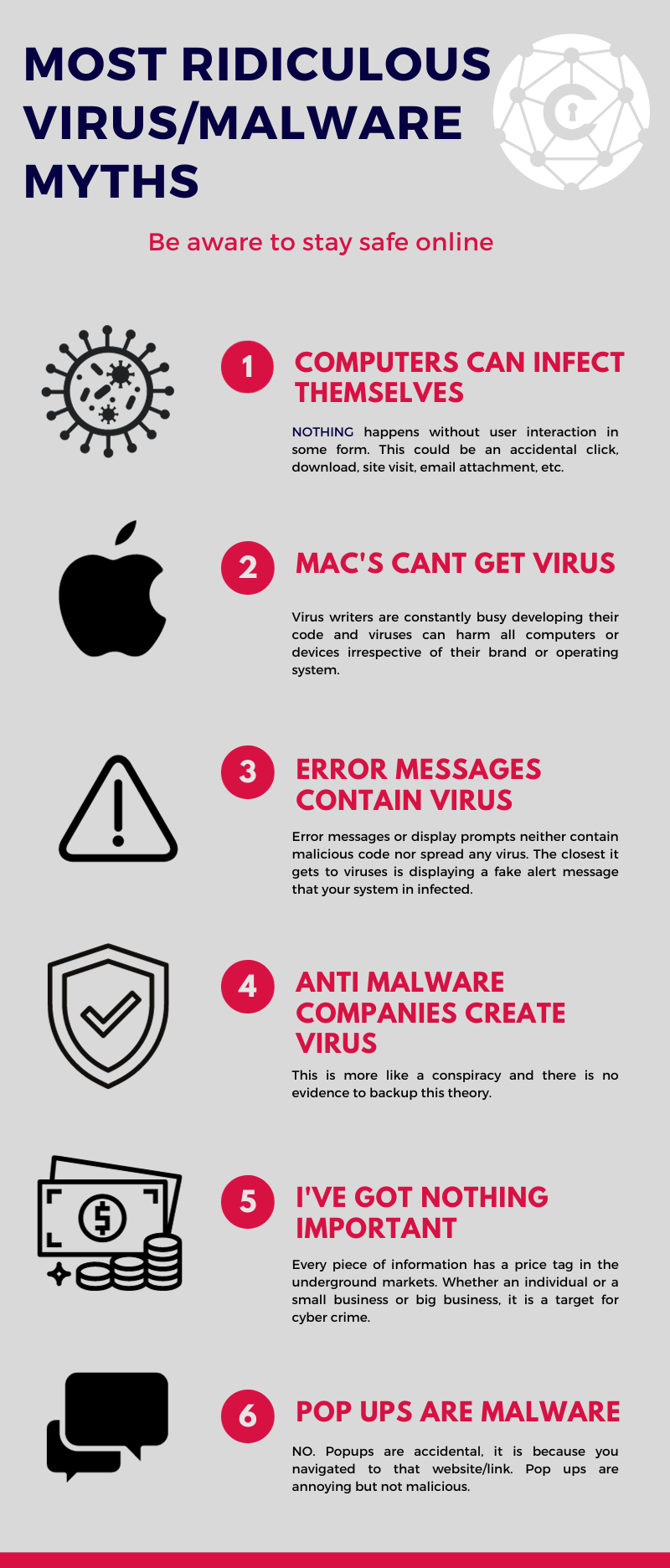
Myth 1: “Macs Don’t Get Viruses.”
Reality: macOS is less targeted but not immune. As its user base grows, so does malware designed specifically for Macs.
Myth 2: “If I Don’t Download Anything, I’m Safe.”
Reality: Drive-by downloads, phishing links, and malicious ads can infect systems without intentional downloads.
Myth 3: “Antivirus Software Slows Down My Computer.”
Reality: Modern antivirus tools are optimized for performance and often improve speed by removing malicious background tasks.
Myth 4: “My Phone Can’t Get a Virus.”
Reality: Android and even iOS devices can be infected through malicious apps or compromised updates.
Myth 5: “Reinstalling Windows Removes All Viruses.”
Reality: Some sophisticated malware can persist in firmware, BIOS, or connected drives, surviving reinstalls.
Myth 6: “All Viruses Are the Same.”
Reality: There are thousands of types, each with unique behaviors — from stealthy data thieves to destructive ransomware.
17. The Human Element in Cybersecurity
No matter how advanced our technology becomes, humans remain both the first line of defense and the weakest link.
Good cyber hygiene starts with:

-
Awareness: Recognizing potential threats.
-
Discipline: Avoiding risky behaviors like clicking random links.
-
Education: Staying updated about evolving attack tactics.
Building a culture of cybersecurity awareness is as important as installing the best antivirus tools.
18. Conclusion: Building a Virus-Resilient Future
Computer viruses have evolved from harmless pranks into one of the most complex and costly problems of the digital age.
In 2025 and beyond, the difference between safe and infected systems often comes down to vigilance, education, and proactive defense.
Key Takeaways
-
Prevention is better than cure.
Regular updates, backups, and responsible online habits protect more effectively than post-infection cleanup. -
Defense in depth is essential.
Relying solely on antivirus software isn’t enough; combine it with firewalls, behavior monitoring, and training. -
AI and automation are double-edged swords.
They will both empower defenders and arm cybercriminals with smarter tools. -
Cybersecurity is everyone’s responsibility.
From individuals to global enterprises, each user plays a role in reducing the spread and impact of computer viruses.

 English
 Arabic
 French
 Spanish
 Portuguese
 Deutsch
 Turkish
 Dutch
Dutch
 Italiano
 Russian
 Romaian
 Portuguese (Brazil)